Dashboard and problems
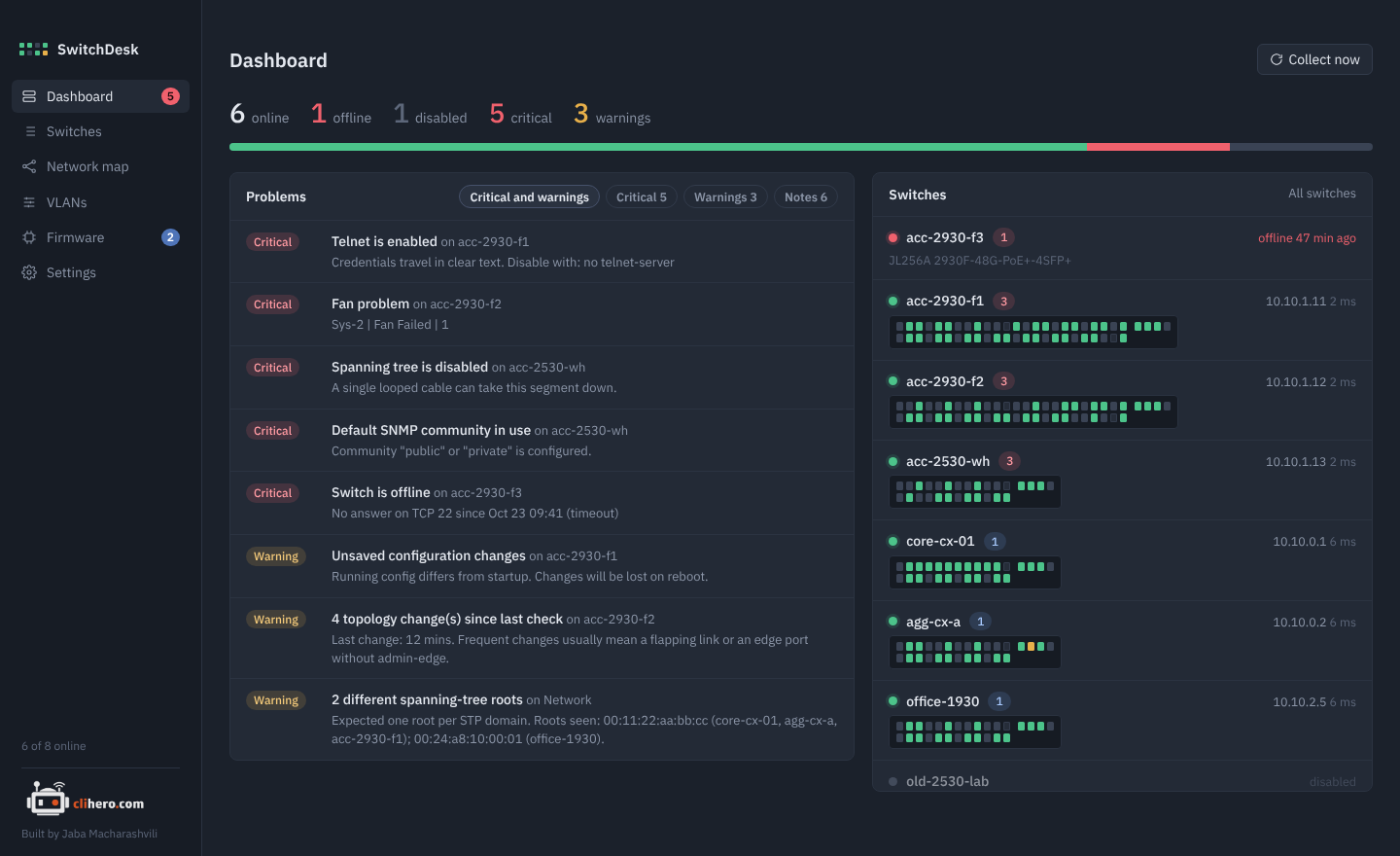
The top line counts switches that are online, offline and disabled, plus critical problems and warnings. The bar under it shows the online/offline split at a glance.
Problems lists everything that needs attention across all switches. The chips filter it: critical and warnings together (the default), only critical, only warnings, or notes. Under them, type to filter by the problem, switch name or details (press / to jump to the box, Esc to clear), or pick a category such as Security or Optics. Click a problem to open its switch.
Switches shows each switch as a small faceplate, offline ones first, then by their worst problem. Every LED is a port:
- green: link up
- grey: link down
- amber: blocked by spanning tree
- outlined: port disabled
Hover an LED for the port number, speed, VLAN and description.
What SwitchDesk checks
Critical
| Problem | Why it matters |
|---|---|
| Switch is offline | Nothing answers on the SSH port. |
| SSH login failed | Wrong or changed credentials. |
| SSH host key changed | The switch presented a different key than before. SwitchDesk stops connecting until you confirm. See troubleshooting. |
| Spanning tree is disabled | One looped cable can take the segment down. |
| Telnet is enabled | Passwords cross the network in clear text. |
| Default SNMP community | public or private is configured. |
| No manager password (AOS-S) | Anyone with access gets full rights. |
| Fan, power supply or temperature problem | Hardware fault reported by the switch. |
Warnings
| Problem | Why it matters |
|---|---|
| Topology changes since last check | Usually a flapping link or an edge port without admin-edge. |
| Root bridge elected by default priority | The root was picked by MAC address, not by design. |
| More than one spanning-tree root | Switches linked at layer 2 disagree on the root: mixed MST regions or a link with spanning tree off. Branches connected only through routers each have their own root and aren't flagged. |
| Optical power alarm / warning | A transceiver receives too little or too much light. AOS-CX compares against the optic's own levels; AOS-S reports its recent optical alarms. |
| Plain HTTP web management (AOS-S) | Web logins aren't encrypted. |
| No NTP/SNTP server | Log times and certificates depend on correct time. |
| Unsaved configuration changes (AOS-S) | Changes are lost on the next reboot. |
| High CPU or memory | Above the limits set in Settings (80% and 90% by default). |
| Major or error events in the log | Taken from the recent log buffer. |
| Data collection failed | SSH worked but reading the switch didn't. |
Notes
Blocked spanning-tree ports (normal on redundant links), no syslog server, local accounts only, and data older than six hours.
Tip
If default SNMP communities are expected in your network, turn the check off in Settings.