Dashboard and problems
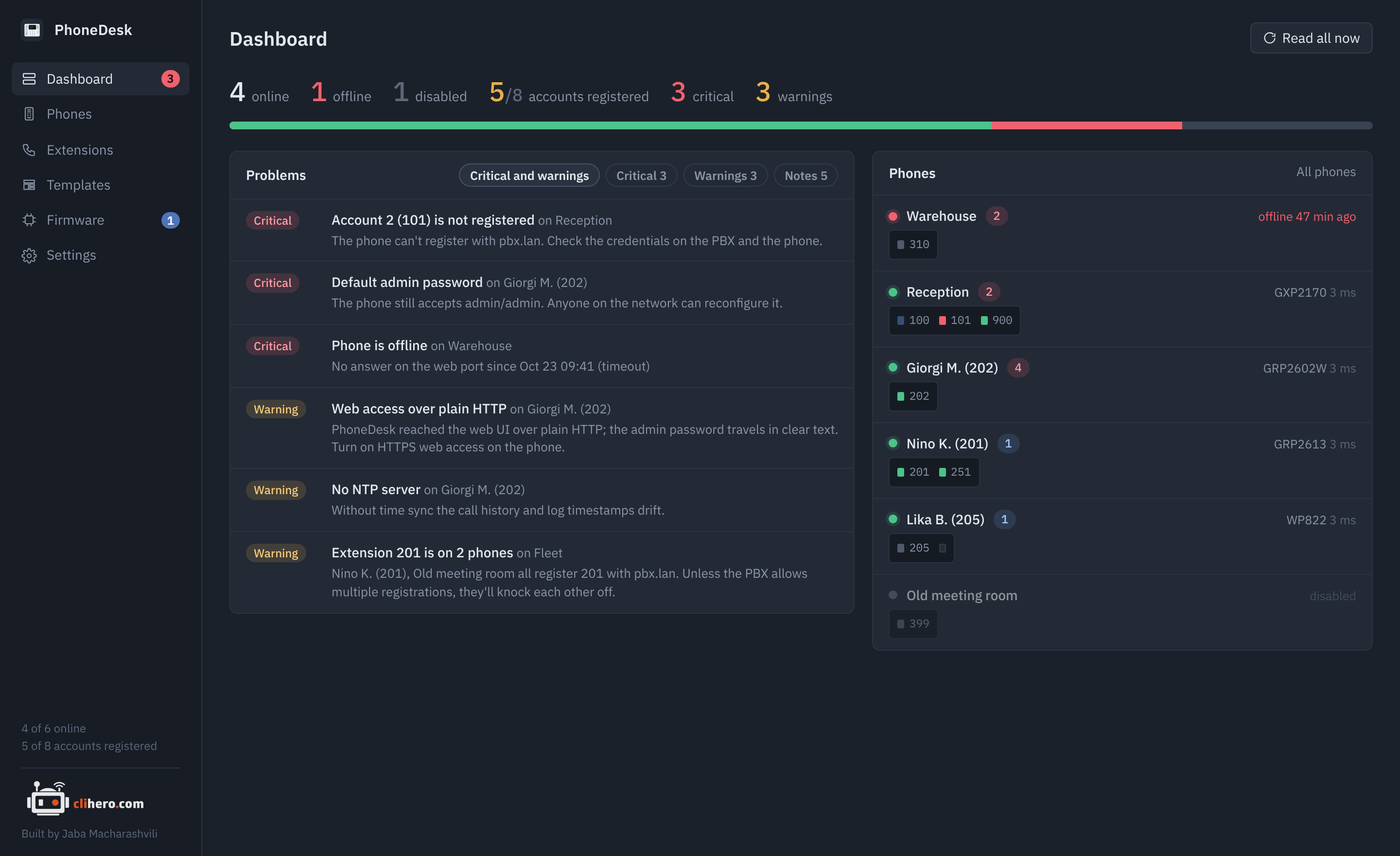
The top line counts phones online, offline and disabled, accounts registered out of active accounts, and problems by severity. Click a count to go to the phone list.
Problems
Every phone is checked against the same rules each time it's read, and the results land here sorted by severity. Click a problem to open the phone. The chips above the list filter it: by default critical problems and warnings are shown; Notes are the informational ones.
| Severity | Check | What it means |
|---|---|---|
| Critical | Phone is offline | The web port didn't answer. Shown with the time it went down. |
| Critical | Web login failed | The credentials were refused. Fix them under Edit, then read again. |
| Critical | Account N is not registered | The line for this account reports "failed". Check the credentials on the PBX and on the phone. |
| Critical | Default admin password | The phone still accepts admin / admin. Anyone on the network can reconfigure it. |
| Critical | Telnet is open | TCP 23 answers. |
| Warning | Reading the phone failed | The phone is up but the read didn't finish. The message has the reason. |
| Warning | Account N has no SIP server | The account is active and has a user ID, but nowhere to register. An active account with nothing in it at all (the factory state of account 2 on many GXP phones) isn't flagged. |
| Warning | No usable SIP account | No active account has a user ID or a server, so the phone can't make or receive calls. |
| Warning | Web access over plain HTTP | PhoneDesk reached the phone over HTTP, so the admin password travels in clear text. If HTTPS answers too, set the phone to HTTPS in Edit. |
| Warning | No NTP server | Call history and log timestamps drift; TLS registrations can fail. |
| Warning | Extension N is on two phones | Two phones register the same extension with the same server. Unless the PBX allows multiple registrations, they knock each other off. |
| Note | SSH is open | Fine if you use it. |
| Note | No syslog server | Events only live in the phone's own buffer until it reboots. |
| Note | DHCP option 66/43 may override the servers | Any DHCP server on the phone's network can point it elsewhere for provisioning. Off by default. |
| Note | Firmware N is in your library | A newer image for this phone's family is available on the Firmware page. |
| Note | Data is more than 6 hours old | The phone hasn't been read in a while. |
Every check can be switched off in Settings; option 66 starts off. The Telnet and SSH checks come from knocking on the ports directly, so they reflect what the phone actually answers, whatever its settings say.
Phones
The right-hand panel draws each phone with one LED per account:
- green: registered
- red: not registered
- grey: the account is switched off
- dim: registration unknown (Action URI support is off on the phone)
- blue, blinking: a line on this account is in a call
Offline phones come first, then phones sorted by their worst problem; disabled phones go last. Click a phone to open it.
Read all now queues a fresh read of every online phone.